I installed Freespire tonight on my Dell Gen1 XPS Laptop. ATI Radeon 9800 and Linksys wireless, which have been my headache with every other distro, worked out of the box. Video is at max rez with Opengl. How refreshing.
My only complaint at the moment is the startup time for the OS. Very slow. Probably takes 5 times longer to boot than XP which I am dual booting. Other than that, I'm perfectly happy with it, so far. Ubuntu has some stiff comp now.
Wednesday, August 02, 2006
Freespire: Coming to you live...

Tuesday, August 01, 2006
Book Review: AJAX and PHP: Building Responsive Web Applications
 I’m a big fan of PHP (though a Java developer by trade) and although I don’t buy into all the hype surrounding AJAX I do appreciate what it can do for a web application when used appropriately. So I was really excited to review “AJAX and PHP: Building Responsive Web Applications”.
What I liked most about this book was that there was no fluff. AJAX is what it is and I felt the authors realize this and wasted no time getting right into it. There is the typical regurgitated information that all tech books can’t seem to ignore in chapter one but luckily not much. In fact, chapter one has you writing your very first AJAX enabled app.
The remaining chapters handle one application after another showing you several different ways you can utilize AJAX in your PHP web applications. Chapter seven, which shows how to implement a real time charting application using SVG, is debatably the most useless chapter in my opinion; however, it is something different that you don’t see similar books covering. And it’s a decent way to avoid using something like an Applet or Flash for similar functionality.
Probably my biggest complaint about the book in general is the authors’ use of XSL for a couple of the examples. This is easily excusable given the rest of the book though. The book does assume a basic understanding of PHP and Javascript but that shouldn’t scare off any newcomers to any of these technologies since you can simply copy and paste and run the code to see the outcome. The appendix has all the instructions for setting up the various technologies used in this book to get the reader going.
All in all I think this is a great introduction to AJAX and since AJAX is server agnostic all the techniques in the book can be applied to the server technology of choice whether its PHP, Java, or even .NET.
Thursday, July 13, 2006
Elegant Image Loading
On my current project I had to display some images associated with a story. We have a servlet that uses ImageMagick and JMagick to dynamically load an image from a database and do various things on the fly like resizing, cropping, etc depending on the params passed in. This servlet is mapped to a variation of the JPG image extension.
When I designed the page and tested it, I noticed that because there might be 12 images going through this process on the page, it appeared that the page loaded very slowly. It also would display those nice little "there's an image getting ready to display here" place holders until the image was finally loaded. This was just annoying and it made for a bad user experience, imho.
To resolve this and make it appear that the images were loading in the background, I put in the following code (click on the image for a larger preview):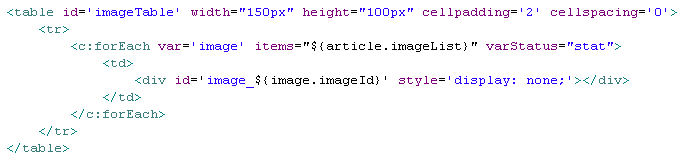
What I did here was for each image in the imageList I created a DIV that is not visible when the page loads. Next, I placed the following code in the window.onload event (click on the image for a larger preview):
What this does is creates a new IMG object on the page for each image in the imageList. When an image has completed loading the file given in the SRC attribute, it's onload event is fired. When this happens I use the Scriptaculous Appear function to allow the image to fade in.
When the page loads, you can't see the empy place holder boxes and it appears the page has completed loading. After which you start to see the images fade in, which is a very elegant effect. If the images are cached, they just begin to fade in that much faster.
One other thing I did which I didn't supply the code for was I placed a transparent div over the entire table with a message in the middle saying Images Loading. As soon as the first img.onload event is fired, I Fade that div out. The effect is very nice.
Wednesday, July 12, 2006
Giving JSF Another Shot - Part Deux
A while back I blogged about Giving JSF Another Shot. Well, I did. I even had the opportunity to use it at my new job. And it failed, miserably.
I spent more time hacking components, hunting for working components, and coding around all the issues surrounding it than I did actually getting any work done. This is by no means a slam on any one implementation mind you, but the specification in general. Sure, maybe 1.2 is fixing those issues. Sure, maybe facelets fixes those issues. Sure, maybe I'll win the lotery. I just don't personally have any more time to devote to it.
I know I haven't blogged in a while, and to start back with something negative isn't always the best approach. But what can I say? I'm opinionated. I have happier thoughts to blog about in the near future.
Monday, May 15, 2006
IntelliJ IDEA and Multiple Projects Views
I love IntelliJ IDEA. But nothing is perfect. And although IDEA comes as close to perfect as anything else, IMHO, there is something I wish I could do, but can't. Sometimes while working on a project I'll also need to work on an API or supporting project at the same time. Currently, I have to have two copies of IDEA open to do this.
I'd like IDEA to support multi project views of some sort. What do you think?
Monday, May 08, 2006
Giving JSF Another Shot
Leaving my opinions on other web frameworks aside, I am going to give JSF another shot. JSF, to me, is one of those technologies that reared its head as the next best thing. And at first glance it was nice. There was the big promise of tool support. I still have yet to see one I really like. But I don't typically like tools that write all my code for me anyway. If I did, I'd use .NET.
After a while though, I started to see the short-comings of JSF. There are issues with JSF and JSP and how the component tree is slapped together. There is the whole back button issue. No true Post back checking ability. But I think my biggest problem with JSF isn't the specification's bugs and/or failures. It's the way it was thrown at me. Sun said, "Here is the next standard" and a lot of the community said "Okay". Interestingly, I think the Struts maintainers adopting JSF for Shale is more likely to push it as a standard than Sun bullying it on me, but only because of Strut's reputation. I've looked at Shale. It still has a ways to go. Config file are really out of control. But that is another story.
With JSF 1.2 lingering around the corner and with projects like Facelets, I think JSF deserves another hard look. MyFaces has really come a long way and the inclusion of ADF Faces components are really going to give that project a super sweet component set.
JSF's role as the new standard for Java based web applications remains still to be seen, even after all this time. And a standard should be determined by the technologies adoption in the community, not by the entity that created said technology.
Monday, January 30, 2006
Checking Multiple GMail Accounts
I decided recently that I wanted a better way to manage all the mailing lists that I belong to. I thought that a good way to do this would be to create a seperate GMail account for each list. I like doing it this way so far but there is still the issue of having to login to each account everytime I want to check for new messages.
I know about the Firefox plugin for checking multiple GMail accounts however, I don't like the dependency on having FF open. I also considered running Thunderbird and adding each GMail account as a POP account, but that ties me down to my computer. I am really looking for something more like the GMail notifier but that will check more than one GMail account. Anyone know of anything?
Friday, January 27, 2006
Book Review: Beginning Python
I could write about how Apress has a knack for publishing great books by great authors. I could write about how “Beginning Python…” is one of my favorite books so far, and not just on Python. I could write about how Magnus Lie Hetland does a wonderful job of introducing the reader to the Python language. I could write about how “Beginning Python…” is one of the few books that actually delves into as many possible uses for the Python language from simple lists and string manipulation to GUI’s to web development. Believe it or not, with all the great content in this book, the best is yet to come.
Starting with Chapter 20 “Beginning Python…” takes the reader through ten (10) complete projects start to finish including two versions of a file sharing application (version two adds a GUI) and a small game. The best way to showcase the power of a language is to show it in action. Magnus does just that with these project chapters. And it makes the book fun. It makes Python fun. It makes learning fun.
For anyone wanting to learn Python or for a Python developer that wants to expand their knowledge and increase their productivity and find new uses for a great language, “Beginning Python…” is a must have. It’s definitely one of my top five (5) favorite programming books.
Tuesday, January 24, 2006
Chuck Norris Fact of the Day
#7. Chuck Norris does not hunt because the word hunting implies the probability of failure. Chuck Norris goes killing.
Chuck Norris Facts
Wednesday, January 18, 2006
Javaranch Journal: January Edition
The January edition of the Javaranch Journal has been published with some excellent articles. Be sure to check it out.
Tuesday, January 17, 2006
I say Tapestry. You Say Wicket.
Tomato Tomato, Potato Potato...Well, probably not. But they aren't apples and oranges either. It seems like everytime I bring up Tapestry, someone brings up Wicket. I looked at Wicket back in its infancy; version 1.0. It looked neat and I did some very light testing with it. And then I dropped it and hadn't really looked at it since.
Since it keeps popping up in conversation I decided that tonight I would start looking at it again. I didn't see any significant changes since I used it last. The documentation has improved but it still seems the downloadable examples are still the only way to see how an entire app is really put together. I've decided that I might put my Tapestry/JSF tutorial on hold until I can possibly explain Wicket well enough to include it in the same tutorial. Kill 3 birds with 1 stone I suppose.
The hardest aspect of Wicket that I can't seem to wrap my head around yet is the use of the IModel interface and it's pluthra of implementations. The documentation does a descent job of explaining what the IModel is, but not so good and explaining when to use which and why. The examples in the documentation are about 2-3 lines long and don't mean much to me. And the framework's use of inner classes seems a bit, well, overused. Most of the time I think this is for simplicity and the ability to create less seperate files when writing how-to articles. Specifically, classes that extend Form always seem to be inner classes as well as anonymous methods for listeners. This is my favorite though.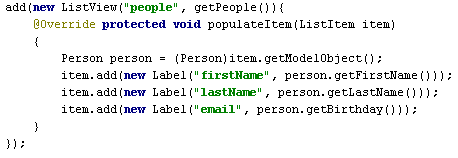
This is code from a series of tutorials by R.J. Lorimer. This doesn't scream simple to me, especially as the site grows and becomes more and more complex. That's not to say this is at the fault of Wicket. I am betting R.J. did this for the simplicity of the tutorial, but at first glance, it's a bit confusing.
Anyway, I plan to keep chugging away for the next couple of days, possibly into the weekend when I have a chance. And then I will decide what direction my article/tutorial on these similar frameworks might be. As always, any input along the way is greatly appreciated.
Monday, January 16, 2006
Should I Write A Tapestry to JSF Comparison Tutorial?
I frriend of mine has requested that I take my JSF Tutorial I wrote a while back and create the same exact tutorial in Tapestry but showing both the JSF and Tapestry code side by side as I go along. I'd prefer not to make a "which is better" assumption on my own but rather let the reader decide for themselves which technology they prefer. I think we all know what I like. And I'd like to keep that opinion as much out of the tutorial as possible to give both a fighting chance.
Is this something that anyone else would be interested in or would I be wasting my time? I know there are a lot of good Tapestry tutorials out there, just not any that I know of that show both the JSF and Tapestry code side by side. Let me know.
Saturday, January 14, 2006
The Benefit of Annotations in Tapestry 4
Annotations are a new addition to Java5. Everyone has an opinion on whether or not they are a good thing. Some people love them, some hate them. Others ride the fence and say they are good for some things but not for others. That is kind of where I tread on the subject. Specifically when it comes to configuration files for my web projects.
Back in the day all you had to worry about was the web.xml, then struts came along and added struts-config. A bit later, tiles.xml and then applicationContext from the spring "beans" (I just decided to call the Spring developers beans). And then the bad boy drops in. Tapestry. Talk about config files. You have a template (html), an associated .page file (xml), an application config (xml), possibly a hivemind module config (xml). Add any other technology into the same mix and you've got xml config files running everywhere. Tracking down the latest bug means traversing through file after file, tracing what xml element was used where. Ugh!
There is no perfect solution for this. Today's applications need configuration files. Believe it or not they do ease long term development. It's the small single developer projects that suffer the most (that would be mostly me). So if I have the chance to lessen the xml config file load I'll take it. Tapestry 4 provides annotation support to replace (optional) page-specifications and/or component-specifications that normally exist in an XML file.
What I like best about this is losing the .page file all together. Before annotations or if you refuse to use them you will have the HTML template and an associated .page file and the associated java class. Using annotations you can move everything in the .page file into the java class. When there are problems or errors instead of flipping back and forth between your .page file and your java class to see what component you forgot to define or what event you forgot to include or spelled wrong in one file or the other, it's all right there in the single java class file. Someone might say you lose some flexibility with this. That you are now required to build your project everytime you make a slight configuration change. To this I would argue that if you are making changes to your .page file, chances are you are going to associate that change in the java class, and vice versa. So you are going to have to build again anyway.
Like I said at the beginning, I tend to feel the same way about annotations as I do about many technologies in general. They have their place. They're not an end all solution. But they do solve problems. Use them when you need them. If you are using Tapestry 4 and not using annotations I'd seriously reconsider. But that's me.
Wednesday, January 11, 2006
Tapestry: "The" Web Framework
I've used Tapestry off and on since version 3.0. Not for anything major, but just enough to keep up with the changes through 4.0. This evening I threw caution to the wind and started converting a PHP app to Tapestry. I say conversion, but really it's a complete rework because I am changing the look and feel as well as a ton of functionallity.
Using Tapestry 4.0 final I accomplished more tonight than I've ever been able to with any other framework (JSF, Struts, WebWork, SpringMVC, Wicket, yes, I've tried them all). Enjoying Web Development With Tapestry is what I've been utalizing as I go along. It's an excellent book and covers everything through the 4.0 final release. Kudos to Kent for such an excellent book which is available as PDF or print.
Currently, I see no reason to use any other j2ee web framework. Even for small projects, Tapestry is so quick and easy to setup and accomplish tasks you'll wonder why you've been mucking around with anything else. And I am not one that typically likes to use frameworks. But I do like getting things done and Tapestry allows me to do just that.
Howard, you da man! And to everyone else that helped Howard along the way, thanks for a great framework. "2006 looks like a true banner year for Tapestry!". Amen brother. I agree 100%.
Tuesday, December 27, 2005
Using Ajax Techniques @ Work
I wouldn't say I condem Ajax. I'd say that I am just skeptical of new "buzz" like technologies and while I have seen the effective use of it via Gmail and various other sites popping up here and there, I never really thought I'd find a good use for it.
On a project I am working on we needed to sort a table of data by clicking on the column headers. A very common task that has been done many many times. The problem though was that since we are pulling all the rows from the database and paging through the results using Javascript there are just too many rows for javascript to handle without choking. Also, because of the way things are done here, it's not an easy process to persist page data to be redisplayed if we were to submit the entire page just to sort a column using SQL.
I suggested using Ajax techniques and it seems to be working out very well for us so far. Clicking on the column headers makes an ajax request to the server for the data already sorted. I then take that data (xml) and rebuild my array in javascript. Turned out to be really simple.
I wouldn't say I condone the use of Ajax...
Tuesday, November 08, 2005
Review: Foundations of Ajax
The first round of Ajax books have hit the shelves and Apress is trying to make their mark with Foundations of Ajax. A thin book with only 273 pages including the index, Foundations of Ajax hits the mark with its recipe style format and examples.
Foundations of Ajax starts out the way most tech books do with a bit of history and primer for what’s to come. Most people familiar with web applications and design can probably just skip chapter 1 and possibly 2. But don’t skip anymore. Chapter 3 jumps right in with your first fully functional Ajax enabled web page and it doesn’t let up. Some of the examples are dynamic tool tips, textfield autocomplete, dynamic drop down lists, and my favorite, the progress bar. The elements of each example are well explained and easy to understand but aren’t diluted with pages of theory and why’s. This book is all how.
The last few chapters all deal with tools for the developer to help make Ajax development easier. It talks about Firefox extensions, JSUnit, and lightly touches on some Ajax frameworks though no working examples of any of the frameworks are shown.
The book was not without its faults, however. There are syntax errors lightly scattered throughout some of the examples. This was frustrating because I had to debug javascript for someone else’s errors. The book also assumes a fair amount of Servlet knowledge and J2EE web app deployment know how. While I’m all for examples in Java, this does limit the books potential customer base. Ajax is pretty much server side technology agnostic. It can be used with ASP, PHP, J2EE, Ruby, and many others. And while the book does touch on this fact, newbies to Servlets will find running the examples difficult.
I whole heartedly enjoyed this book and it really wet my appetite for Ajax and how I can use it to improve my own applications UI and provide a better experience for the end user. I’d highly recommend this to anyone wanting to learn the “Foundations of Ajax”.
Friday, November 04, 2005
KornShell Scripting Reference
I've been doing quite a bit of KornShell scripting at my new job the past couple of days. I am familiar with bash primarily so I was needing some reference to KornShell and it took me forever to find something good. This link was buried about 9 pages deep in google. It answered a lot of questions that other tutorials and links just didn't touch on. So I thought I would share it in case anyone else needs something similar.
Unix KornShell Quick Reference
Happy scripting!
Tuesday, November 01, 2005
Just An Update On My New Job
[I noticed that this post has made it to the top of javablogs Hot list. I added this blog to javablogs yesterday and it aggregated everything. This post is really old and I am not even at this job anymore. Sorry about that.]
I got yelled at the other day for not having any updates on my weblog for a long time. Not that me taking long breaks from blogging is anything new, but I figured I'd go ahead and throw out one today.
Last week I started a new job at DST Output in Kansas City, MO. So far things are going pretty well. I'm enjoying being at a job where I am getting paid to write code full time instead of my part time consulting work. The company has a great history and great financials. My colleagues have been very helpful in getting me up to speed on everything we do here.
I would say more about the work I am doing and the company however, only being here a week, I am not quite sure what all I am at liberty to speak about in public. More to come in later days I am sure. Now back to work...
Friday, September 30, 2005
Evaluating MyEclipse IDE for JSF Development
Today I decided to start really evaluating MyEclipse IDE. Their 4.0 version offers many new and exciting enhancements including some for JSF development. These are just a few observations I've made thus far and as I continue to use it I'm sure I'll be adding more.
- When in design mode, after adding a component, the mouse cursor will turn to a circle with a line and not allow you to click in the design editor anymore. Switching to source mode then back to design mode fixes this until the next time you add a component.
- There is no palette component for h:outputText (forums - known issue. have to wait until next version at least)
- Design mode does not represent a panelGrid correctly. For example, I created a panelGrid with 2 columns. I then added 4 components expecting 2 columns. In design mode all four components are displayed in a horizontal flow layout. Not a grid layout as expected. Same goes for the preview tab.
- There is no tool button on the faces-config design palette for adding a managed-bean.
- When adding a managed-bean with properties via the wizard, the managed-bean declaration in faces-config contains managed-properties for each declared property. At the very least this should be an option as managed-properties are, at most times, not required.
- There are no options to specify expression language values for managed-properties.
- There is currently no palette support for MyFaces extensions, although MyEclipse IDE has MyFaces support which is to say it adds JAR's for you and web.xml entires. (forums - known issue. Have to wait for next version and even then it's a maybe??)
Ok, these seem to all be complaints. Hopefully as I use it more I'll have something good to say about it. I've searched for some of these issues on the support forums and noted findings in the list above.
Monday, September 12, 2005
Are You Really Blogging About Splash Screens?
Reading my javablogs email today I noticed 2 very similar posts. New Netbeans 5.0 Graphics and Cool New Netbeans Welcome Screen. Are you serious? Are you really blogging about splash screens? I'm not a Netbeans user but I can think of a hundred other Netbeans topics that are a lot more important than it's splash screen. But I guess this is where blogging has been going for some time. Can't think of anything important to blog about so I'll pick the most mundane meaningless topic possible. And here I am blogging about people blogging about Splash Screens. Oh well...
Subscribe to:
Posts (Atom)
